
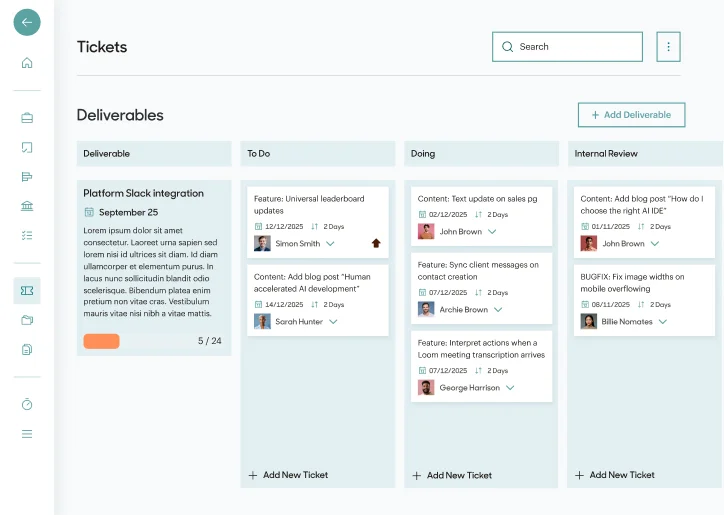
Actually's custom ticket management system showing task progress

World class organisation

Unsurpassed insight into task progress

A custom built delivery platform keeps everyone on track. You see exactly what stage every ticket is at and we manage our resources better than any business on the planet (probably... we haven't surveyed all businesses on the planet but we'd throw the gauntlet DOWN for that challenge!)
Compare the process for each of our plans

This is exactly how the process goes for each of the packages in detail

Release process

Client and brand setup

All packages
01

Brand onboarding brief

If the brand(s) you are working with don't have a design system setup in Figma yet then we'll need to create one. This can be a call or a ticket if you have links to other sources of brand identity.

02

Setup brand design system

Create the design system from the brand assets in a format that supports the build process. This will include publishing an asset library of colours, corners, shadows and so forth as well as any imagery and icons packs the brand may need.

03

Setup tech build systems

Put in place the foundation for all future builds of web, mobile and desktop applications (anything that needs an interface). This includes folder structures, repository team, Kubernetes for container management, ArgoCD for CI/CD, commit hooks, linting, automated testing, monitoring, hosting team and anything else we may need so that we aren't doing it when you want to be getting tech out the door.

04

Publish style framework pages

Integrate the design system into the tech setup so that everything built works from the same visual reference.

Creative for release 1

Full service
05

Project kickoff call

We begin with a collaborative session to understand your business objectives, target audience behaviours, and competitive landscape. This strategic foundation ensures every creative decision is anchored in commercial reality and user truth, not just aesthetic preference.

06

Audience research

Deep dive into your audience segments to uncover their motivations, pain points, and decision-making drivers. We identify the emotional triggers and rational reasons to believe that will form the backbone of compelling message architecture. This isn't guesswork—it's evidence-based insight.

07

Project research

Comprehensive analysis of your product's unique value proposition, technical capabilities, and market differentiators. We establish the proof points and credibility markers that will support your claims, ensuring every message has substance behind it.

08

Creative definition

From research insights, we craft the strategic creative framework: defining your message hierarchy, establishing reasons to believe for each claim, and determining the emotional territory your brand will own. This blueprint guides all subsequent creative execution, ensuring consistency and impact.

09

Content structure

We architect the narrative flow for each page or feature, plotting the user's journey through information hierarchy. Every section is purpose-built to move audiences from awareness through consideration to action, with clear calls-to-action positioned at optimal decision points.

10

Copywriting for page / feature one

Professional copywriting that brings the strategy to life. We craft headlines that arrest attention, body copy that builds conviction through clear reasons to believe, and calls-to-action that convert. Every word earns its place, working together to move your audience toward their goal—and yours.

Feedback iteration repeats as necessary

Design for release 1

Design and build Full service
11

Page / feature one design ticket

The design brief is created from either client requirements or the strategic framework. This includes objectives, audience insights, technical constraints, brand guidelines, and success criteria.

12

Design page / feature one completed

Our design team creates pixel-perfect interfaces in Figma. Layout structures guide user attention, visual hierarchy supports the message architecture, and the design system ensures consistency throughout.

13

Page / feature one design feedback

You review the design and provide structured feedback focused on strategic objectives. Does it communicate the right message hierarchy? Will it resonate with the target audience and drive the desired action?

14

Applies feedback to design

The design team implements your feedback with thoughtful refinements to improve clarity, impact, and user experience. Changes are versioned in Figma until the design achieves sign-off.

Feedback iteration repeats if needed

Build for release 1

All packages
15

Page / feature one build ticket

The build ticket is created with technical specifications, approved designs, and functional requirements. This includes component structure, data integration points, responsive behavior, and accessibility standards.

16

Build page / feature one

Our development team builds the page or feature from the Figma designs using modern, maintainable code. Each component is tested for functionality, performance, and cross-browser compatibility before moving forward.

17

Publish to staging app for review

The build is deployed to our staging environment where you can review it in a live browser. Test it on different devices, check all interactions, and experience the actual performance before providing feedback.

18

Page / feature one build feedback

You review the staging build and provide feedback on functionality, visual accuracy, and user experience. This is your opportunity to catch issues before production release.

19

Rebuild page / feature one

The development team implements your feedback, fixing bugs, adjusting behavior, and refining details. All changes are tested internally before the updated build is ready for your review.

20

Update staging for review

The revised build is deployed to staging for another review cycle. This iterative process continues until the build meets all requirements and achieves final approval for production release.

Feedback iteration repeats if needed

Release 1 for project

All packages
21

Approves staging build for production

Once you've reviewed the staging build and confirmed it meets requirements, simply move the ticket from "In Review" to "Approved for Release". This schedules a human to trigger and manage the deployment to production. Humans where it is important, AI where you can speed.

22

Pushes all of staging to live

The approved build is deployed to production through our automated CI/CD pipeline. The deployment is versioned, monitored, and can be rolled back instantly if any issues are detected.

23

Runs QA testing

Automated AI browser testing validates functionality across devices and browsers. Our AI agents simulate real user journeys, catching edge cases and ensuring consistent behavior in production.

24

Runs PEN testing

Penetration testing scans for security vulnerabilities, checking authentication, data validation, and potential attack vectors. Your application is probed for weaknesses before malicious actors can find them.

25

Human review

Our team performs a final manual review of the live production build. We verify the deployment succeeded, check critical user paths, and confirm monitoring systems are tracking performance correctly.

Process repeats for creative, design and build of Release 2
Update process

Content update request

All packages
26

Content update request ticket

You create a ticket requesting content updates to existing pages or features. Specify what needs to change, why it's needed, and any new messaging or positioning requirements.

Creative for content update

Full service
27

Research for content update

We research the changes needed, reviewing current content performance, user feedback, and market positioning. This ensures updates are strategic, not just cosmetic.

28

Copywriting for content update

New copy is crafted to improve clarity, strengthen messaging, or address user concerns. Each word is chosen to enhance communication and drive better outcomes.

29

Content creative feedback

You review the updated copy and provide feedback. Does it better serve the strategic goals? Is the tone right for your audience?

30

Applies creative feedback

The creative team refines the copy based on your input, ensuring the updated content aligns with your vision and strategic objectives.

Feedback iteration repeats if needed

Design for content update

Design and build Full service
31

Imagery for content update

New or updated imagery is sourced or created to support the revised content. Visual assets are chosen to reinforce messaging and enhance user engagement.

32

Layout design for content update

The design is updated in Figma to accommodate new content and imagery. Layout adjustments ensure visual hierarchy remains clear and effective.

33

Content design feedback

You review the updated design with new imagery and layout. Does it present the content effectively and maintain visual consistency?

34

Applies design feedback

The design team implements your feedback, refining imagery and layout until the updated design achieves approval.

Feedback iteration repeats if needed

Build for content update

All packages
35

Build content update

The development team implements the content changes, updating text, imagery, and any layout modifications. Code changes are tested for functionality and visual accuracy.

36

Push content update to staging

The updated content is deployed to staging for your review. Test the changes in context to ensure they work as intended.

37

Content update build feedback

You review the staging build and provide feedback on the implementation. Does everything display correctly and function as expected?

38

Rebuild content update

The development team addresses your feedback, making necessary adjustments until the content update meets approval.

Feedback iteration repeats if needed

Push content update live

All packages
39

Approve content update for production

Move the ticket to "Approved for Release" to schedule deployment. A human will manage the production release to ensure smooth execution.

40

Push content update to production

The content update is deployed to production through our automated CI/CD pipeline. The deployment is versioned, monitored, and can be rolled back instantly if needed.

41

Runs QA testing

Automated AI browser testing validates functionality across devices and browsers. Our AI agents simulate real user journeys, catching edge cases and ensuring consistent behavior in production.

42

Runs PEN testing

Penetration testing scans for security vulnerabilities, checking authentication, data validation, and potential attack vectors. Your application is probed for weaknesses before malicious actors can find them.

43

Human review

Our team performs a final manual review of the live production build. We verify the deployment succeeded, check critical user paths, and confirm monitoring systems are tracking performance correctly.

Content updates repeat as needed throughout project lifecycle

Why we don't build for a CMS

As technologists, we've put in place a LOT of complexity in the past to mitigate technical risk and increase the speed of delivery. Building in complex systems like a CMS allows regular users to make changes without the risk or delay of technical work. BUT, what if there were no risk or delay now? What if your content update could be whatever it needed to be? To look however it needed to look not just to look like whatever modules you've built for a CMS? What if every piece of content passed through professional creatives, designers and devlopers and that process was super quick and easy? What if there were no CMS learning curve with time consuming onboarding and resource intensive training? With AI and automation, you can and should eliminate all this complexity. No user management overhead. No design limitations. Your content gets exactly the design it needs, and your brand can evolve freely without waiting for years-long rebuilds.

Read article
Modern content management workflow
Discovery call Our packages